Tuesday, August 27, 2019

Welcome To Media Studies!

Welcome back, class of 2022! I hope you all had a restful and enjoyable summer.

This year is partly devoted to media studies and journalism (non-fiction writing). What you learn here can help you improve your writing skills, give you an opportunity to examine national and international issues, improve your use of conflict and characters in your plots, play and experiment with media (blogs, television, radio & film scripts, podcasts, magazines, comic books, video games, photography, etc.) as well as make you a better critical thinker. Primarily, this course will hone and continue to develop your writer's craft and your writer's voice. The other half of your year (with Ms. Gamzon) will focus on the craft of writing with an in-depth look at how to write effective poetry, fiction, and plays.

Anyway, after reviewing our course criteria and working on a writer's "manifesto" (I'll collect these by the end of class today), we will get started with a required writing activity and start on a couple of assignments to begin this course. By the end of class today, we'll get our locker assignments.

IMPORTANT INFORMATION:

Check this blog each class period for agendas, deadlines, educational information, advice, and a whole lot of links to enhance your education. You can sign up for email alerts when I post new material.

This blog is a resource for your learning. All you have to do is read and click. Homework assignments and helpful guides or suggestions on how to proceed or succeed on a task will be available here. Much of your writing will be uploaded to our Google classroom site (see links to the side of this page).

You are responsible for reading and interacting with the material I post on the blog. It is a useful resource for the course (since we don't have a specific textbook)--so please use it. You can even see it on your cell phones (which you shouldn't have with you during class...) when you go home.

Assignments that can be turned in digitally (no printing!) will be posted in the Google Classroom. Go there now (https://classroom.google.com) and enter this code: c7l88tz to join the class.

Make sure that when you are in class using a Chromebook that you do the following EACH DAY:
  • Log in. 
  • Open a TAB and go to our classroom BLOG: https://sotamediastudies.blogspot.com
  • Open a SECOND TAB and go to GOOGLE CLASSROOM: https://classroom.google.com, etc.
  • Keep both TABS open during class or as instructed. It's also a good idea to open a THIRD TAB in Google to take class notes (or write class notes by hand if you prefer...) 
  • When using headphones (only as instructed please!) please make sure you have only one ear bud in your ear at any time. Lower volume so that only you can hear what is being played. Abuse of this rule will result in the class privilege being revoked.  
  • You are aware that no cell phones are allowed in school. District/school policy. Please follow it to avoid any unnecessary issues. 
  • After class, please plug your Chromebooks back into the cabinet where you received them. The Chrome symbol should appear at the top of the computer when you plug in correctly. 
If you're absent or missed something in class, please check the blog to get caught up. As indicated above, each new class period usually includes a new post. If you have a question about an assignment and are too embarrassed to speak to me in public (or you have a question that you think you will forget to ask), feel free to use the comment section. Be aware comments are meant for help or questions, not to communicate with friends and peers. It is your responsibility to talk to me about your needs. This is your education. Make it worthwhile.

On our link page and in Google Classroom, you will also find some useful tools for this course. During the course, I will direct your attention to these tools for your use in this class and for use in The Craft of Writing.

Today, after learning about the course and responding in class, let's begin with a baseline writing exercise.

With time remaining, please begin working on your homework chapter (Mass Media, pages 3-15). Read and answer the vocabulary questions on the GOOGLE CLASSROOM ASSIGNMENT FORM. Submit your work before the beginning on next class for full credit.

HOMEWORK: Complete your baseline essay. Read chapter one, part one: Mass Media, pg. 3-15 and answer the questions as directed in our Google Classroom. Submit your answers in Google classroom when complete. 

Thursday, June 13, 2019

Final Exam; Documentary Project; Final Portfolio

Please take the first 15 minutes of class today to prepare/study for your final exam. Once we begin, we will expect test-taking procedures (no visiting, no cell phones, no bathroom breaks, no talking, etc.)

When you have turned in your test, please continue working on either:

A. Your documentary project (due by tomorrow at 11:59 p.m.); upload your film to Youtube and send me either the URL address of your film in the COMMENT section of this blog post, or upload your MP4 film file to our Google Classroom. Remember: your documentary should have opening/closing credits with the names of who did what job clearly marked.
  • Also, remember to turn in your notes/voice-over script for the project.

B. Work on your final portfolio (due tomorrow). See Ms. Gamzon's instructions for details. 

HOMEWORK: Complete your course work. 

Monday, June 10, 2019

Documentary Project; Study for Final Exam

Please use the time in the lab today to study for your final exam (Thursday, June 13) and complete your documentary projects.

Types of Documentaries:
All documentaries have similar basic principals and/or qualities:
1. The events depicted in the film are unstaged; the events exist above and beyond the diegesis (the film world) or the act of filming them. The unstaged nature of the events suggest that the events or subjects have an existence independent of the cinema, thus granting them an air of authenticity or "realism".

2. Documentaries are understood to be non-fiction films. The world or diegesis of what appears on screen is considered real, not imaginary (as in fiction films).

3. It is often assumed that the documentary film maker observes, recording events or subject matter objectively. This is, of course, an untrue or uninformed statement.

There are Five different TYPES of documentary:
A. Expository documentary: the film maker's commentary acts as the "voice-of-God", often giving information or perspectives external to the filmed world in order to "see the world afresh, even if the world seems romantic (idealized) and/or didactic. Here's an example: the Last Lions (2011) & March of the Penguins (2005), & the network series Our World (2019)

B. Observational documentary: The film maker records events depicted in the film unobtrusively, without intervention from the film-maker, capturing "real life" without commentary, intertitles, or interviews. The documentary type depicts a "slice of life" or direct representation without comment or subjectivity of the film maker. The film maker is completely invisible and/or uninvolved. Ex. The French film: Etre et Avoir about elementary schools in France, and the 2010 film What's the Matter With Kansas.
C. Interactive documentary: The filmmaker's perspective and opinion is more evident. Interview styles allow the film maker to participate actively in presenting of events. It is sort of the opposite of the observational documentary. Sometimes the film maker him/herself is present in the film, asking questions or juxtaposing their opinion with others. Unlike expository documentaries, the film maker is present instead of a disembodied voice of authority (god).
Roger & Me (1989) but also Bowling For Columbine, Morgan Spurlock's Super Size Me (2004) and Capitalism a Love Story (2009), Where to Invade Next (2016), and Fahrenheit 9/11 (2018)

D. Reflexive documentary: Going one step further from interactive documentary, the film maker of reflexive documentary does not attempt to hide the convention of film making. You know you are "watching a film" about "making a film." While documentaries are usually considered realistic, the camera work in a reflexive documentary are much more similar to formalism (the opposite style to realism). Example "Man with a Movie Camera" (1928)

E. Performative documentary: Going beyond the reflexive documentary, the performative documentary seeks to evoke mood or atmosphere traditionally found in fiction films. It can be downright avant garde and formalistic. Its purpose is more metaphorical than literal, although what's important is that it is a documentary that is performed. Here's an example: Survivors by Erol Morris.
Documentary projects are due Friday. You must upload the files to Youtube and send me the links.

All missing or late work must be turned in by Friday, June 14 for credit.

HOMEWORK: Study for your exam. Complete your documentary film project.

Friday, June 7, 2019

Final Exam Review for Media Studies

Final Exam Review: (Material covering Jan. 29 post - current)
  • Television & Cable (chapter 6)
  • Vladimir Zworykin & Philo Farnsworth (blog, chapter 6)
  • Charles Francis Jenkins, the father of American Television (blog)
  • Analog, digital, and HDTV (chapter 6)
  • Prime time & the prime time access rule (PTAR) (chapter 6)
  • The development of cable (the network era) (chapter 6)
  • narrowcasting (chapter 6)
  • Podcasting (blog)
  • Premium channels, Pay-per-view (PPV), Video-on-demand (VOD), and Direct broadcast satellite (DBS), VCR's, DVD's, DVR's (chapter 6)
  • Time shifting (6)
  • Third screens (internet) & fourth screens (Smartphones) (6)
  • Television genres: sketch comedy, situational comedy, anthology dramas, episodic series, chapter shows, serial programs, network news, reality tv, game/quiz shows, etc. (6)
  • Public television (PBS) and its effect/influence (6)
  • The telecommunications Act of 1996 (6)
  • Television production and distribution (6)
  • Syndication (6)
  • Television ratings (6)
  • Major broadcast companies (ABC, NBC, CBS, FOX, PBS, Netflix, AT&T, Comcast, Time Warner, Hulu, etc.) (6)
  • I Love Lucy (blog)
  • Twilight Zone (blog)
  • Star Trek (blog)
  • The FCC (blog & chapter 6, etc.)
  • RCA (blog & chapter 6 & chapter 5)
  • The history of Television (blog)
  • How to write a TV script and a scripts 3-act structure (blog)
  • Story pitch, Teaser, Subplot, Slugline, Description, Dialogue, Transitions (blog)
  • 6 Days to Air (South Park documentary)
  • The Rule of Thirds (photographic journalism, blog)
  • Visual storytelling (blog)
  • Rules of Photographic Composition (blog)
  • PSA (public service announcement)
  • Propaganda (blog)
  • Public Relations & Advertising (blog)
  • The History of Journalism (blog & links; chapter 14)
  • Objective/subjective (blog)
  • Johannes Gutenberg & the Printing Press, John Peter Zenger & NY Weekly journal, Ben Franklin & the Saturday Evening Post, Penny Presses, Joseph Pulitzer & Randolph Hurst, Yellow Journalism, The Yellow Kid, Radio & Radio Broadcasting, Adolph Ochs & the New York Times, newsreels, Tom Wolfe & New Journalism, Hunter S. Thompson & Gonzo Journalism, Woodward & Bernstein (chapter 8, & blog, technology presentations)
  • Nellie Bly (blog)
  • The Pulitzer Prize (blog/article, chapter 8)
  • Investigative Journalism (blog)
  • New Journalism (blog)
  • Journalism terms: masthead, headline, byline, feature, op ed, dateline, exclusive, etc.
  • Attribution & leads (blog)
  • Different types of leads: name, event, time, place, cause, manner (blog)
  • Different types of angles for journalism articles (blog)
  • The inverted pyramid (blog)
  • Featuring the feature (blog)
  • How to create an outline (blog, handout)
  • Journalist ethics (blog; handouts; chapter 14) & Values in American Journalism (chapter 14)
  • The Associated Press (blog)
  • Fake news & Snopes (blog)
  • Shattered Glass (film); plagiarism
  • Goodnight & Good Luck (film); Edward Murrow & McCarthyism, censorship (blog/article)
  • Conflict of interest (chapter 14)
  • News (chapter 14)
  • What makes something newsworthy (blog & chapter 14)
  • Active vs. passive voice & tips on how to write in a more journalistic style (blog)
  • Objective, literary, and interpretive journalism (chapter 8)
  • Consensus vs. conflict-oriented journalism (chapter 8)
  • Ethnocentrism, responsible capitalism, small-town pastoralism, individualism (chapter 14)
  • Types & styles of Documentaries (blog)
  • Public Relations, Propaganda, & Advertising (blog & chapter 12)
  • Film (Chp. 7)
  • Film camera shots: extreme long shots, extreme close ups, close ups, long shots, full shots, reaction shots, medium shots, deep focus shots, high and low angles, birds-eye angle, high & low key lighting, panning, crane/tracking shots, eye-line match shot, etc.
  • Edweard Muybridge, Edison, & the Lumieres (chp. 7)
  • The kinetoscope, nickelodeons, etc. (chp. 7)
  • Convergence in the media (all chapters--you should be able to apply the concept to television, film, newspapers, journalism, etc.)

Film Critique Due! Final Exam Review, Documentary Project

Your film critique article is due at the end of class. Please complete and turn in for a grade. This film review article may also be counted in your final portfolio.

You may also work on our documentary projects in lab today and the rest of our classes (today, June 7, Tuesday, June 11, and after our final exam on Thursday, June 13.)

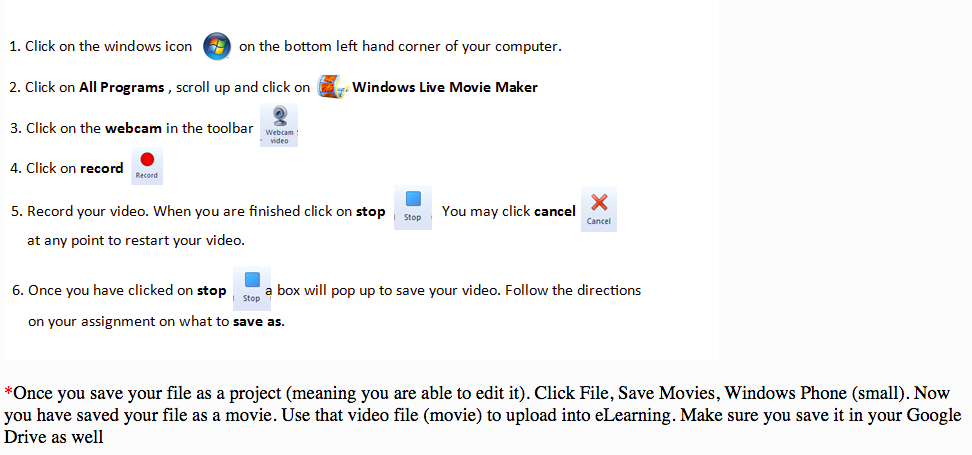
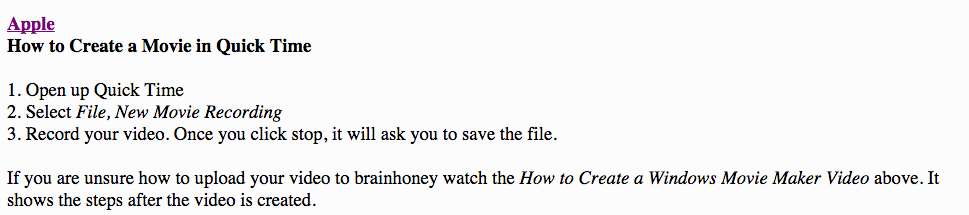
If you have shot some (or all) of your footage, use Windows MovieMaker's editing software to create your film. Here are some other options as well:


Directions for Submitting Video Files

So you created a video for your class and you want to submit it for a grade? 
Here are the steps you need to follow:
https://api.agilixbuzz.com/Resz/~EdcxAAAAAAQJKy2w-NB1AA.KThRnXRlcP9RKhv-yySbCA/48500091,EE,5,0/Assets/Images/MovieMakerMovie.pnghttps://api.agilixbuzz.com/Resz/~EdcxAAAAAAQJKy2w-NB1AA.KThRnXRlcP9RKhv-yySbCA/48500091,EE,5,0/Assets/Images/QuickTimeMovie%20.png

Using CHROME books: by Jack Wallen:

Filming short videos on a Chromebook is fast and easy. To do so, you need a Chromebook with a camera and your Chromebook must be associated with your Google Drive account.

Opening the Camera App

Before you can do anything, you'll need to log into your Chromebook.

Opening the Camera App
 Opening the Camera App.

After you’ve logged on, follow these steps:
  1. Click the menu button located on the bottom left corner of the desktop.
  2. Type camera in the search bar.
  3. Make sure the camera icon is selected.
  4. Press Enter on your keyboard (or simply double-click the camera icon).

Switching to Video Mode

By default, the camera app opens in camera mode. To switch it to video mode click on the icon that looks like video camera (directly to the left of the camera button at the bottom center of the app window). You are now in video mode and are ready to film your first Chromebook video.

Switching to camera mode.
 Switching to camera mode.

Filming Your First Video

With the camera in video mode, click the oblong red button in the bottom center of the camera app window. You are now filming.

Filming your video.
 Filming your video.

While you are filming, the camera button will lightly pulse and the icon will change slightly to a more solid camera. When you’ve completed the filming session, click the oblong red button again and the session will stop.
Note: One thing you must know is that (especially for video) you’re going to need plenty of lighting. Natural lighting is your best option. If you cannot film outside, make sure you’re shooting your video in a room that is lit quite well. If your video looks grainy you don’t have enough light, regardless of which Chromebook you are using. Even a high-end Pixelbook cannot take quality video in dimly lit rooms. Although you might get away with lesser quality pictures, no one wants to watch a grainy video.

Saving Your Video


Saving your video.
 Saving your video.

After you’ve finished filming, you need to save the video. To do this:
  1. Select the Gallery icon (the double square in the bottom-right corner of the camera app).
  2. Inside the Gallery, select the video you want to save.
  3. Click Save (the downward-pointing arrow in the bottom right corner of the Gallery app).

The gallery app is now open.
 The gallery app is now open.

After clicking the Save button, a new window will appear to help you determine where to save the file.

Saving your video to the local drive.
 Saving your video to the local drive.

Since your Chromebook is associated with your Google Drive account, you have the option of saving it to the cloud. If you want to save it to the local drive, place it in the Downloads folder (under My Files).

Naming Your Video

One rather odd thing about saving videos on a Chromebook: You cannot rename them in the saving process. The default name will be VID_DATE_TIME.webm (where DATE and TIME are the date and time you filmed the video).

Renaming Your Video

Although you can't rename your video during the saving process, you can do it later.

Renaming your video.
 Renaming your video.

If you want to rename your video, do the following:
  1. Click the menu button (bottom left corner of the desktop).
  2. Type the word files.
  3. Double-click on the Files app.
  4. Navigate to the folder housing your video.
  5. Two-finger tap the video file.
  6. Select Rename.
  7. Type a new name.
  8. Press Enter on your keyboard.
That’s all there is to renaming your video.

What To Do With Your Video

What you will do with your new video is up to you. You might be slightly limited, because of the .webm file format. Fortunately, many services (such as YouTube) do support .webm files, so go ahead and upload that file to YouTube and share away.

If you find you need to convert your .webm video to a format like .mp4, there are online services (such as Video Converter) that do a good job of converting to almost any format.

The film documentary is due Friday, June 14 by end of day (11:59 p.m.) 

We will screen our documentaries in class on our last day, June 17. Feel free to bring in snacks on Monday, June 17 (last day of scheduled classes before finals week).

HOMEWORK: Work on your film documentary. Study your notes/handouts for our upcoming Final Exam (Thursday, June 13).

Wednesday, June 5, 2019

Citizen Kane Critique Article; Documentary Project

Please upload and submit your answers to the chapter on Film to our Google Classroom. No late work will count for this assignment after the deadline.

We will conclude Citizen Kane today in class. After you view the film, please use your notes (see previous classes) and write your last article for the year: a 300-500 word film critique of Citizen Kane.

You may format your article in the standard 2-column style for journalism.

Remember that journalistic style in writing requires clarity, concise sentence structure, and the answers to the 5 W's and 1 H. Use the inverted pyramid style as well to determine what is most important in your critique.

Examine the film's production value, artistic value, acting, directing, theme, or cinematography (photography) in your analysis and evaluation of the film. See previous posts, notes, and handouts about the film to assist you.

Your film critique article will be due at the end of class on Friday, June 7.

You may also work on our documentary projects in lab today and the rest of our classes (Friday, June 7, Tuesday, June 11, and after our final exam on Thursday, June 13. The film documentary is due Friday, June 14 by end of day (11:59 p.m.) We will screen our documentaries in class on our last day. Feel free to bring in snacks on Monday, June 17 (last day of scheduled classes).

HOMEWORK: Work on your film documentary. You should have footage ready to edit by Friday, if possible.

Monday, June 3, 2019

Citizen Kane (Conclusion); Documentary Film Project

We will continue watching Citizen Kane today in class. As you watch, take notes on your own paper, answering the prompt questions A-F on the handout. Together with these notes, write a 300-500 word critique of the film Citizen Kane (due Friday, June 7)

If we have time at the end of the period, we will work on our documentary projects (or you can work on your homework. See below).

HOMEWORK: Please read Chp. 7 (The Film Industry) and complete ?'s for Wednesday, June 5. This will count as a quiz grade. No late work will be accepted. See Google Classroom for details. Finally, make sure you have an idea/subject for your documentary film project. Identify who you might interview or what topic you are making a film of. Once you know this information, schedule time this week to shoot your interview/or create your film. Gather photos and JPGs or music or clips from Youtube with a converter. Make sure you collect all your materials for the film this week (film footage, MP4's, your voice over script, etc.)

Game Review Article; Ready Player One

  Please write a review of the Atari 2600, NES or Sega game you played. Your article should include the following: 1. A researched historic...