Friday, June 7, 2019

Final Exam Review for Media Studies

Final Exam Review: (Material covering Jan. 29 post - current)
  • Television & Cable (chapter 6)
  • Vladimir Zworykin & Philo Farnsworth (blog, chapter 6)
  • Charles Francis Jenkins, the father of American Television (blog)
  • Analog, digital, and HDTV (chapter 6)
  • Prime time & the prime time access rule (PTAR) (chapter 6)
  • The development of cable (the network era) (chapter 6)
  • narrowcasting (chapter 6)
  • Podcasting (blog)
  • Premium channels, Pay-per-view (PPV), Video-on-demand (VOD), and Direct broadcast satellite (DBS), VCR's, DVD's, DVR's (chapter 6)
  • Time shifting (6)
  • Third screens (internet) & fourth screens (Smartphones) (6)
  • Television genres: sketch comedy, situational comedy, anthology dramas, episodic series, chapter shows, serial programs, network news, reality tv, game/quiz shows, etc. (6)
  • Public television (PBS) and its effect/influence (6)
  • The telecommunications Act of 1996 (6)
  • Television production and distribution (6)
  • Syndication (6)
  • Television ratings (6)
  • Major broadcast companies (ABC, NBC, CBS, FOX, PBS, Netflix, AT&T, Comcast, Time Warner, Hulu, etc.) (6)
  • I Love Lucy (blog)
  • Twilight Zone (blog)
  • Star Trek (blog)
  • The FCC (blog & chapter 6, etc.)
  • RCA (blog & chapter 6 & chapter 5)
  • The history of Television (blog)
  • How to write a TV script and a scripts 3-act structure (blog)
  • Story pitch, Teaser, Subplot, Slugline, Description, Dialogue, Transitions (blog)
  • 6 Days to Air (South Park documentary)
  • The Rule of Thirds (photographic journalism, blog)
  • Visual storytelling (blog)
  • Rules of Photographic Composition (blog)
  • PSA (public service announcement)
  • Propaganda (blog)
  • Public Relations & Advertising (blog)
  • The History of Journalism (blog & links; chapter 14)
  • Objective/subjective (blog)
  • Johannes Gutenberg & the Printing Press, John Peter Zenger & NY Weekly journal, Ben Franklin & the Saturday Evening Post, Penny Presses, Joseph Pulitzer & Randolph Hurst, Yellow Journalism, The Yellow Kid, Radio & Radio Broadcasting, Adolph Ochs & the New York Times, newsreels, Tom Wolfe & New Journalism, Hunter S. Thompson & Gonzo Journalism, Woodward & Bernstein (chapter 8, & blog, technology presentations)
  • Nellie Bly (blog)
  • The Pulitzer Prize (blog/article, chapter 8)
  • Investigative Journalism (blog)
  • New Journalism (blog)
  • Journalism terms: masthead, headline, byline, feature, op ed, dateline, exclusive, etc.
  • Attribution & leads (blog)
  • Different types of leads: name, event, time, place, cause, manner (blog)
  • Different types of angles for journalism articles (blog)
  • The inverted pyramid (blog)
  • Featuring the feature (blog)
  • How to create an outline (blog, handout)
  • Journalist ethics (blog; handouts; chapter 14) & Values in American Journalism (chapter 14)
  • The Associated Press (blog)
  • Fake news & Snopes (blog)
  • Shattered Glass (film); plagiarism
  • Goodnight & Good Luck (film); Edward Murrow & McCarthyism, censorship (blog/article)
  • Conflict of interest (chapter 14)
  • News (chapter 14)
  • What makes something newsworthy (blog & chapter 14)
  • Active vs. passive voice & tips on how to write in a more journalistic style (blog)
  • Objective, literary, and interpretive journalism (chapter 8)
  • Consensus vs. conflict-oriented journalism (chapter 8)
  • Ethnocentrism, responsible capitalism, small-town pastoralism, individualism (chapter 14)
  • Types & styles of Documentaries (blog)
  • Public Relations, Propaganda, & Advertising (blog & chapter 12)
  • Film (Chp. 7)
  • Film camera shots: extreme long shots, extreme close ups, close ups, long shots, full shots, reaction shots, medium shots, deep focus shots, high and low angles, birds-eye angle, high & low key lighting, panning, crane/tracking shots, eye-line match shot, etc.
  • Edweard Muybridge, Edison, & the Lumieres (chp. 7)
  • The kinetoscope, nickelodeons, etc. (chp. 7)
  • Convergence in the media (all chapters--you should be able to apply the concept to television, film, newspapers, journalism, etc.)

Film Critique Due! Final Exam Review, Documentary Project

Your film critique article is due at the end of class. Please complete and turn in for a grade. This film review article may also be counted in your final portfolio.

You may also work on our documentary projects in lab today and the rest of our classes (today, June 7, Tuesday, June 11, and after our final exam on Thursday, June 13.)

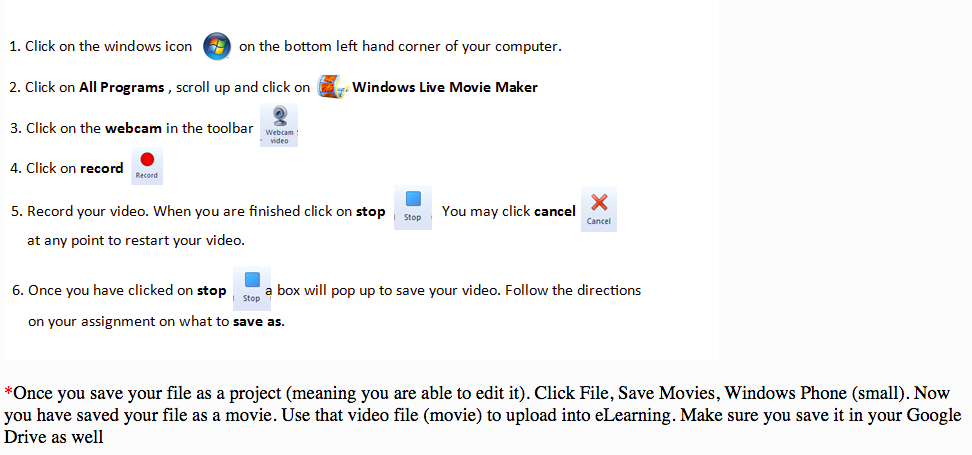
If you have shot some (or all) of your footage, use Windows MovieMaker's editing software to create your film. Here are some other options as well:


Directions for Submitting Video Files

So you created a video for your class and you want to submit it for a grade? 
Here are the steps you need to follow:
https://api.agilixbuzz.com/Resz/~EdcxAAAAAAQJKy2w-NB1AA.KThRnXRlcP9RKhv-yySbCA/48500091,EE,5,0/Assets/Images/MovieMakerMovie.pnghttps://api.agilixbuzz.com/Resz/~EdcxAAAAAAQJKy2w-NB1AA.KThRnXRlcP9RKhv-yySbCA/48500091,EE,5,0/Assets/Images/QuickTimeMovie%20.png

Using CHROME books: by Jack Wallen:

Filming short videos on a Chromebook is fast and easy. To do so, you need a Chromebook with a camera and your Chromebook must be associated with your Google Drive account.

Opening the Camera App

Before you can do anything, you'll need to log into your Chromebook.

Opening the Camera App
 Opening the Camera App.

After you’ve logged on, follow these steps:
  1. Click the menu button located on the bottom left corner of the desktop.
  2. Type camera in the search bar.
  3. Make sure the camera icon is selected.
  4. Press Enter on your keyboard (or simply double-click the camera icon).

Switching to Video Mode

By default, the camera app opens in camera mode. To switch it to video mode click on the icon that looks like video camera (directly to the left of the camera button at the bottom center of the app window). You are now in video mode and are ready to film your first Chromebook video.

Switching to camera mode.
 Switching to camera mode.

Filming Your First Video

With the camera in video mode, click the oblong red button in the bottom center of the camera app window. You are now filming.

Filming your video.
 Filming your video.

While you are filming, the camera button will lightly pulse and the icon will change slightly to a more solid camera. When you’ve completed the filming session, click the oblong red button again and the session will stop.
Note: One thing you must know is that (especially for video) you’re going to need plenty of lighting. Natural lighting is your best option. If you cannot film outside, make sure you’re shooting your video in a room that is lit quite well. If your video looks grainy you don’t have enough light, regardless of which Chromebook you are using. Even a high-end Pixelbook cannot take quality video in dimly lit rooms. Although you might get away with lesser quality pictures, no one wants to watch a grainy video.

Saving Your Video


Saving your video.
 Saving your video.

After you’ve finished filming, you need to save the video. To do this:
  1. Select the Gallery icon (the double square in the bottom-right corner of the camera app).
  2. Inside the Gallery, select the video you want to save.
  3. Click Save (the downward-pointing arrow in the bottom right corner of the Gallery app).

The gallery app is now open.
 The gallery app is now open.

After clicking the Save button, a new window will appear to help you determine where to save the file.

Saving your video to the local drive.
 Saving your video to the local drive.

Since your Chromebook is associated with your Google Drive account, you have the option of saving it to the cloud. If you want to save it to the local drive, place it in the Downloads folder (under My Files).

Naming Your Video

One rather odd thing about saving videos on a Chromebook: You cannot rename them in the saving process. The default name will be VID_DATE_TIME.webm (where DATE and TIME are the date and time you filmed the video).

Renaming Your Video

Although you can't rename your video during the saving process, you can do it later.

Renaming your video.
 Renaming your video.

If you want to rename your video, do the following:
  1. Click the menu button (bottom left corner of the desktop).
  2. Type the word files.
  3. Double-click on the Files app.
  4. Navigate to the folder housing your video.
  5. Two-finger tap the video file.
  6. Select Rename.
  7. Type a new name.
  8. Press Enter on your keyboard.
That’s all there is to renaming your video.

What To Do With Your Video

What you will do with your new video is up to you. You might be slightly limited, because of the .webm file format. Fortunately, many services (such as YouTube) do support .webm files, so go ahead and upload that file to YouTube and share away.

If you find you need to convert your .webm video to a format like .mp4, there are online services (such as Video Converter) that do a good job of converting to almost any format.

The film documentary is due Friday, June 14 by end of day (11:59 p.m.) 

We will screen our documentaries in class on our last day, June 17. Feel free to bring in snacks on Monday, June 17 (last day of scheduled classes before finals week).

HOMEWORK: Work on your film documentary. Study your notes/handouts for our upcoming Final Exam (Thursday, June 13).

Wednesday, June 5, 2019

Citizen Kane Critique Article; Documentary Project

Please upload and submit your answers to the chapter on Film to our Google Classroom. No late work will count for this assignment after the deadline.

We will conclude Citizen Kane today in class. After you view the film, please use your notes (see previous classes) and write your last article for the year: a 300-500 word film critique of Citizen Kane.

You may format your article in the standard 2-column style for journalism.

Remember that journalistic style in writing requires clarity, concise sentence structure, and the answers to the 5 W's and 1 H. Use the inverted pyramid style as well to determine what is most important in your critique.

Examine the film's production value, artistic value, acting, directing, theme, or cinematography (photography) in your analysis and evaluation of the film. See previous posts, notes, and handouts about the film to assist you.

Your film critique article will be due at the end of class on Friday, June 7.

You may also work on our documentary projects in lab today and the rest of our classes (Friday, June 7, Tuesday, June 11, and after our final exam on Thursday, June 13. The film documentary is due Friday, June 14 by end of day (11:59 p.m.) We will screen our documentaries in class on our last day. Feel free to bring in snacks on Monday, June 17 (last day of scheduled classes).

HOMEWORK: Work on your film documentary. You should have footage ready to edit by Friday, if possible.

Monday, June 3, 2019

Citizen Kane (Conclusion); Documentary Film Project

We will continue watching Citizen Kane today in class. As you watch, take notes on your own paper, answering the prompt questions A-F on the handout. Together with these notes, write a 300-500 word critique of the film Citizen Kane (due Friday, June 7)

If we have time at the end of the period, we will work on our documentary projects (or you can work on your homework. See below).

HOMEWORK: Please read Chp. 7 (The Film Industry) and complete ?'s for Wednesday, June 5. This will count as a quiz grade. No late work will be accepted. See Google Classroom for details. Finally, make sure you have an idea/subject for your documentary film project. Identify who you might interview or what topic you are making a film of. Once you know this information, schedule time this week to shoot your interview/or create your film. Gather photos and JPGs or music or clips from Youtube with a converter. Make sure you collect all your materials for the film this week (film footage, MP4's, your voice over script, etc.)

Thursday, May 30, 2019

Citizen Kane (Film, Day 1)

Our last project is to create a short documentary. Today, before we begin watching Citizen Kane, brainstorm some documentary ideas. Here are a few student films from the past as some examples of the form. You may work alone or with a single partner.
How to go about doing this project. 
1. Decide to work alone or with a single partner. 
2. If you work alone: make a list of potential subjects for your human interest video or a documentary. Choose one as your subject (this can be a family member, a friend, a neighbor, a teacher, a person of interest, or an overlooked or important topic, etc.)
3. If you work with a partner who will be your subject, decide who will be the subject and who will be the videographer.
4. Videographers should come up with some interview questions to ask the subject. Record your questions and answers in your journal.
5. Decide on where you will shoot video footage of your subject. You may have to travel, so plan accordingly. Brainstorm different possible settings to use as an appropriate backdrop for your video in your journal.
6. Record your interview with your subject. Use some of this material (the best parts) for your video.
7. Use your smartphones or video equipment (you can borrow this from our department) to make your film.
8. Upload your video/audio footage into Windows Movie Maker (or iMovie or Premiere, or other video software if you have access to it).
9. Edit and prepare your video. It should be about 2-5 minutes in length.
10. Upload your video when it is completed.

At 12:40, we'll will read a little of Citizen Kane (the script) and then begin watching the film.

HOMEWORK: Please read Chp. 7 (The Film Industry) and complete ?'s for Wednesday, June 5. This will count as a quiz grade. No late work will be accepted. See Google Classroom for details. Finally, get an idea/subject for a documentary film project. Identify who you might interview or what topic you are making a film of.

Tuesday, May 28, 2019

Film Unit: Types of Film Shots; Shot Exercise; Introduction to Citizen Kane

Welcome to our brief Film Unit.

When we discuss the choice of a particularly shot, filmmakers have several options. We can shoot a scene from an extreme long shot, a long shot, a full shot, a medium shot, a close-up, an extreme close up, using a birds-eye angle, a high or low angle, an eye-level-match angle (the default), or decide to use a truck, track, crane, pan, or trolley device to help frame and move the focus of the camera on the subject of the film. But with all these options, we also need to include the following terms to our vocabulary:

classical cutting: editing for dramatic intensity and emotional emphasis rather than for purely physical reasons.

Shifting from long to close or close to long shots shifts the viewers POV within a scene. This can be done to emphasize, include, exclude, consolidate, connect, contrast, or parallel the action of the plot, to introduce an important motif or detail for story-telling purposes (just like describing an important object in fiction), etc.

Master Shot (also known as a sequence shot): a scene of continuous film, usually at long-range, that is used as the through-line of a film or scene.

Reaction Shot: a cut from dialogue to the reaction of the person listening to the dialogue.

Two-shot: a shot that includes just enough space for two-characters to show that they are in the same space.

Three-shot: as a two-shot, but with enough room for three. How cozy!

First cut: a sequence of shots in editing that represents the director's preference for how the scene should be "shot."

Final cut: a studio or producer's preferred cutting of the film. (As opposed to the directors: first cut)

Cover shot: a shot used to reestablish a sequence, (time or space), or establishing shot used to reorient the viewer.

Eye-line Match: A character looks a certain direction, then we cut to what they are supposed to be looking at.

Matching action: similar to the eye-line match, but this involves any movement that is suggested as being continuous, even though it's not shot that way. Example: a tight shot of a person opening a door, the next shot is of that person arriving in another room. It is assumed that the door leads to the room seen, but this is rarely the case in filming.

Mise en Scene: more on this one later, it is literally "what is included in a shot."

180 degree rule: used to stabilize the space of the playing area so the viewer isn't confused or disoriented. Essentially keeping the camera on the same side of the 180 degree line of a scene.

Reverse angle shot: most commonly used in dialogue scenes, the camera moves between two speakers, first showing one, then the other.

Parallel action: just as in literature, the juxtaposition of shots that show complimentary shots. These shots are often from a different location.

Cross-cutting: moving between two or more locations or scenes in a film (often in rapid succession, but not always) to tell parallel stories.

Thematic montage: stress the association of ideas, rather than the continuity of plot, time, or space.

Motifs: objects, places, people, visual pictures, that are repeated to create significance or meaning.

Some advice:
  • the longer the shot, the slower the film pacing. 
  • the shorter the shot, the faster the film pacing. 
  • Longer shots usually include more visual information.
  • Shorter shots usually include less visual information.
  • Cut your scenes at the "content curve": the moment when the viewer has had just enough time to take in the visual information in a scene.
  • Cutting your scene BEFORE the content curve, creates anxiety, frustration, and/or disorients the viewer.
  • Cutting the scene AFTER the content curve, frustrates and bores an audience.
  • Watch these instructional videos:
Working in groups of 3, please do the following:

  1. Use the classroom cameras.  
  2. Go shoot different shots (see the handout you were given in class for this project) that illustrate the 3-5 shots you were given. Take no more than 5 minutes to do this.
  3. When you return, please upload your film files to Windows Movie Maker and create TITLES for each film example you took. 
  4. Make sure the names of your group members are listed on the title card/slide!
  5. Render your film, save it as an MP4, then submit it to Google Classroom. We will screen your group's film during period 8.
If you finish your film (and we are waiting for the other groups to finish, please read about Citizen Kane below). 

Period 8:

After viewing our film projects, we will discuss Citizen Kane.

We will eventually view Orson Welles' ("War of the Worlds") masterpiece Citizen Kane. Today, let's learn about the film.


Citizen Kane (intro)

Topping the best films of all time is the important and influential 1941 film by Orson Welles: Citizen Kane (1941). As we view Citizen Kane, there are a series of important elements that can enrich our understanding of this film.

Orson Welles as Auteur:

Welles directed, wrote (partial), and starred in this film (even though it was thought he wasn't old enough to portray Kane). While Welles had direct control over the film and its look, there were other people who contributed artistically. Some of the invention and creativity of film making includes:

Camera Work:
  • The Deep Focus shot! (the deep focus shot includes action in the foreground, mid-ground, and background of a shot). 
  • Low angle shots revealing ceilings!
  • Moving shots used as wipes!
  • Overlapping dialogue! (not original to Welles, but a trend in Screwball Comedies)
  • Long uninterrupted shots!
  • Expressionist lighting and photography!
Narrative/Special techniques:
  • Multiple perspective!
  • Flashbacks!
  • Aging!
Motifs and themes:
  • The American Dream: For all of Kane's "success", he is not happy. He dies lonely, with only his "possessions" around him. Is all our striving to succeed in America an illusion?
  • Perspective: The differing perspectives on Kane's life, especially in the absence of Kane's own point of view, force us to question what was truly important in Kane's life (and by extension what constitutes a life well lived in general.) Judging by Kane's last muttered word: Rosebud, the most important pieces of Kane's life were not the things that made him newsworthy, such as his newspaper successes and political ambitions, nor his friendships and associations. As Thompson interviews different people about Kane, we are given different perspectives on the man (some are unreliable). Odd, though, that we do not see Kane from Kane's POV.
Motifs:
  • Isolation (loneliness...it's lonely at the top...)
  • Materialism/Capitalism
  • Old Age (the end of the line...)
Symbols:
  • The Snowglobe
  • Sleds
  • Statues
Allusions:
Director: Orson Welles
Writers: Herman J. Mankiewicz and Orson Welles (screenplay)
Cinematography by Gregg Toland

Orson Welles ... Charles Foster Kane
Joseph Cotten ... Jedediah Leland
Dorothy Comingore ... Susan Alexander Kane
Agnes Moorehead ... Mary Kane
Ruth Warrick ... Emily Monroe Norton Kane
Ray Collins ... James W. Gettys
Erskine Sanford ... Herbert Carter
Everett Sloane ... Mr. Bernstein
William Alland ... Jerry Thompson
Paul Stewart ... Raymond
George Coulouris ... Walter Parks Thatcher
Fortunio Bonanova ... Signor Matiste
Gus Schilling ... The Headwaiter
Philip Van Zandt ... Mr. Rawlston
Georgia Backus ... Bertha Anderson
Harry Shannon ... Kane's Father
Produced by Orson Welles and George Schaefer .... executive producer

Original Music by Bernard Herrmann
Film Editing by Robert Wise
Casting by Rufus Le Maire & Robert Palmer
Art Direction by Van Nest Polglase
Set Decoration by Darrell Silvera
Costume Design by Edward Stevenson
Makeup by Maurice Seiderman

Let's read a little bit of the script together to get you started. Then, we'll screen the scene.

HOMEWORK: None. You may read the rest of Citizen Kane to get the idea of how we write a film script.

Wednesday, May 22, 2019

Shattered Glass (conclusion); Coffeehouse/Catch up

After screening the film Shattered Glass, please complete and turn in your packets for participation credit. That is Activity 1, part 1 (you did part 2 in class before viewing the film); Activity 2 (part 1 only); and Activity 3 (part 1 only), and both parts of Activity 4 (see below).

About Activity 4: 

Additionally, please research one of the following journalists and find out what they did that was unethical (What was the situation they were accused of regarding journalist ethics? Which rule did they break? What happened to them professionally? Etc.):

  • Julie Amparano
  • Mike Barnicle
  • Jayson Blair
  • Janet Cooke
  • Ken Dilanian
  • Michael Finkel
  • Sean Hannity
  • Mike Huckabee
  • Jack Kelley
  • Lara Logan
  • Rachel Maddow
  • Bill O'Reilly
  • Ruth Shalit
  • Patricia Smith
  • Juan Thompson
  • Mike Tobin
Post your answer in the COMMENT section of MY BLOG for credit.

Finally, please complete activity 4, part 2 as a BLOG POST entry on YOUR BLOG.

HOMEWORK: None. Coffeehouse tonight at 7:00. Join us!


Game Review Article; Ready Player One

  Please write a review of the Atari 2600, NES or Sega game you played. Your article should include the following: 1. A researched historic...